Add General Purpose Input to camera
This page last updated: Monday September 21, 2026.
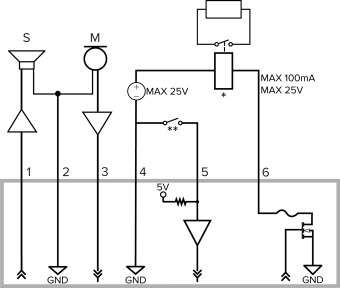
Alta Video leverages camera General Purpose Input (GPI) connections to integrate external sensors. For example, wiring a touch sensor to the camera input enables custom rule triggers, generating real-time system alerts upon activation. All Avigilon camera devices support one input into the device, Avigilon PTZ cameras can support up to three inputs. Currently, only camera input is supported. Camera output will become available in a future update.
To connect a basic sensor, wire a dry contact button or relay directly between the Input and GND pins. Opening or closing this circuit toggles the sensor's value, while the software's Circuit state setting determines which position acts as the normal or active state.
Task — Add a General purpose input to your camera.
Go to the Devices page, then Sensors and click
 add sensor.
Select Discover available ports from the options menu.
Choose the target camera port from the list of detected available inputs, then click Next.
Verify the automatically detected Name and Type. If needed, modify the sensor type using the dropdown menu.
Click Add to complete the configuration.
Task — View the added input
Navigate to Devices > Sensors.
Select the specific sensor from the main list.
Open the right-hand panel and click Detailed Information to view full port status and technical attributes.
