Alta Protect monitoring service alarm flow
This page last updated: Friday January 16, 2026.
When an alarm triggers in an deployment with the Alta Protect monitoring service enabled, the alarm is processed as follows.
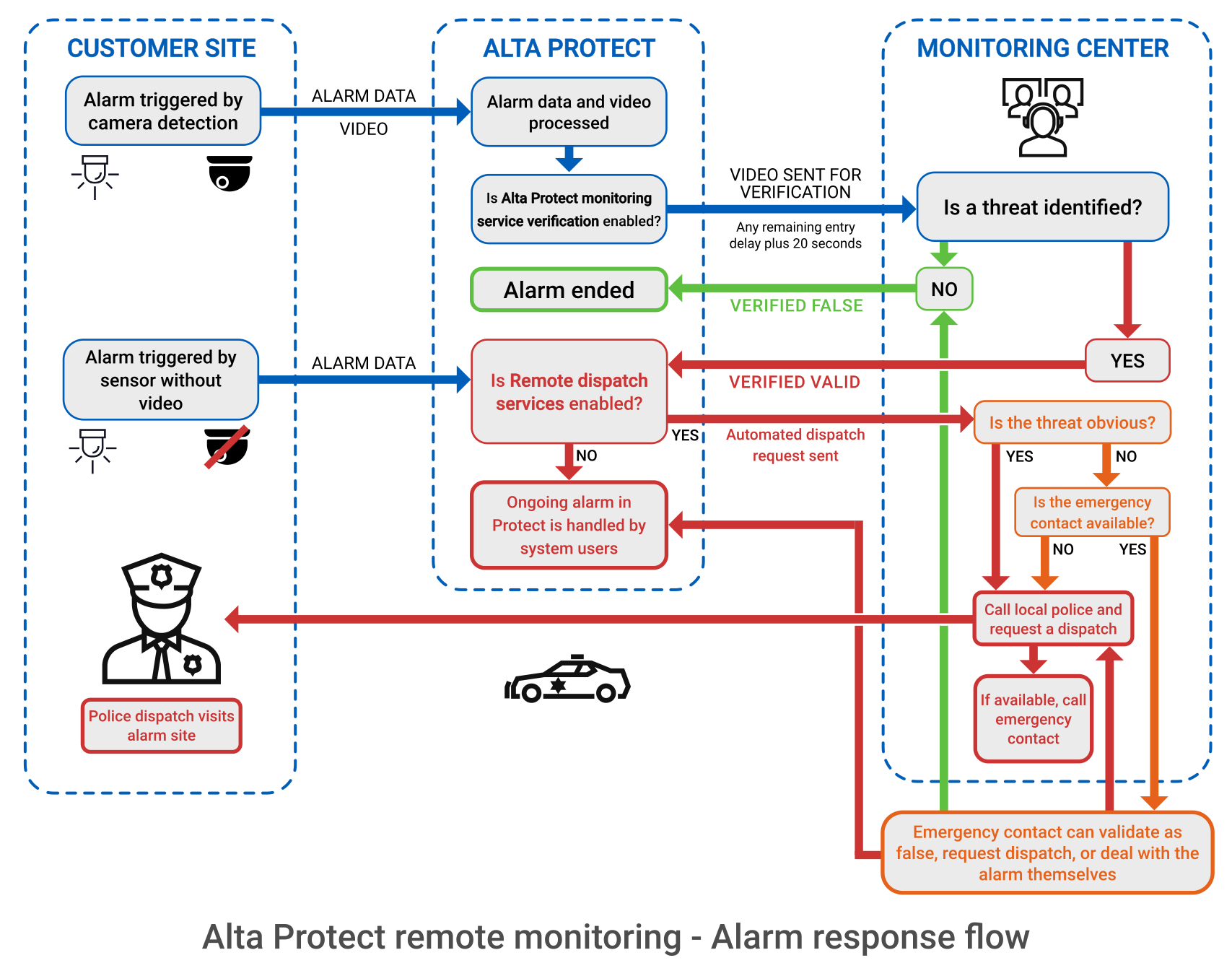
Alarm response flow
Assuming the alarm trigger has associated cameras that capture incident footage, and the zone has Alta Protect monitoring service and
- Alarm triggered at the customer site in an armed zone.
- Alarm data and video flows to the Alta Protect platform via the cloud.
- If
Alta Protect monitoring service verification is turned on for the zone, the video is sent to the monitoring service:- The video is 20 seconds long, starting when the alarm triggers.
- If the detection is made in a zone with an entry delay, the video starts when then detection is made and runs until the delay ends plus 20 seconds.
- For example, If a person is detected when there is 25 seconds left of the entry delay, and they do not disarm the zone, then the video clip is 45 seconds long.
- Alarm data and video are reviewed by the monitoring service.
- The average response time for verification is approximately 40 seconds.
- Operators can see only the video clip sent with the alarm.
- The operator takes the appropriate action to deal with the alarm.
For alarms with no video, see Sensor-only alarms.
Operator alarm responses
The response chosen by the operator is shown in the Alta Protect Alarm tool in the
No threat detected
If an operator determines no threat appears in the video:
- The alarm status is set to False.
- An operator cannot verify an alarm as false until they have viewed the entire clip.
Valid threat detected
If an operator determines there is a threat:
- The alarm status is set to Valid, triggering any configured alarm actions in Alta Protect.
- If
Remote dispatch services is turned on, an automated dispatch request is sent back to the monitoring service. - An operator does not need to watch the entire video before verifying an alarm as valid.
Dispatch requests
Clear threats
If the operator can identify a clear threat in the video, they can contact the local police and request a dispatch to the address listed for the site.
- After requesting a dispatch for a clear threat, the operator attempts to notify the emergency contact.
Unclear threats
An operator might not be able to determine there is a clear threat, for example, people loitering or if the camera view is obstructed.
- The operator attempts to reach the emergency contact for the site who can decide the appropriate response.
- If the emergency contact is unreachable, the operator requests a police dispatch to investigate.
Identifying monitoring service calls
To safely identify calls to emergency contacts, see Alta Protect monitoring service phone numbers.
